| SEO title | Customer Onboarding Automation for B2B SaaS: Workflow Guide |
|---|---|
| Meta description | Automate B2B SaaS customer onboarding from closed deal to first value: handoff, account setup, onboarding emails, tracking and mistakes to avoid. |
| URL slug | /blog/customer-onboarding-automation-b2b-saas |
| Primary keyword | customer onboarding automation |
| Secondary keywords | SaaS customer onboarding automation, customer onboarding process automation, automated customer account setup, customer onboarding email automation, customer onboarding workflow |
| Search intent | Informational with commercial investigation (Cluster 4 SaaS Operations, customer onboarding; supports Cluster 2 and the AI workflow automation pillar) |
| Schema | Article + FAQPage |
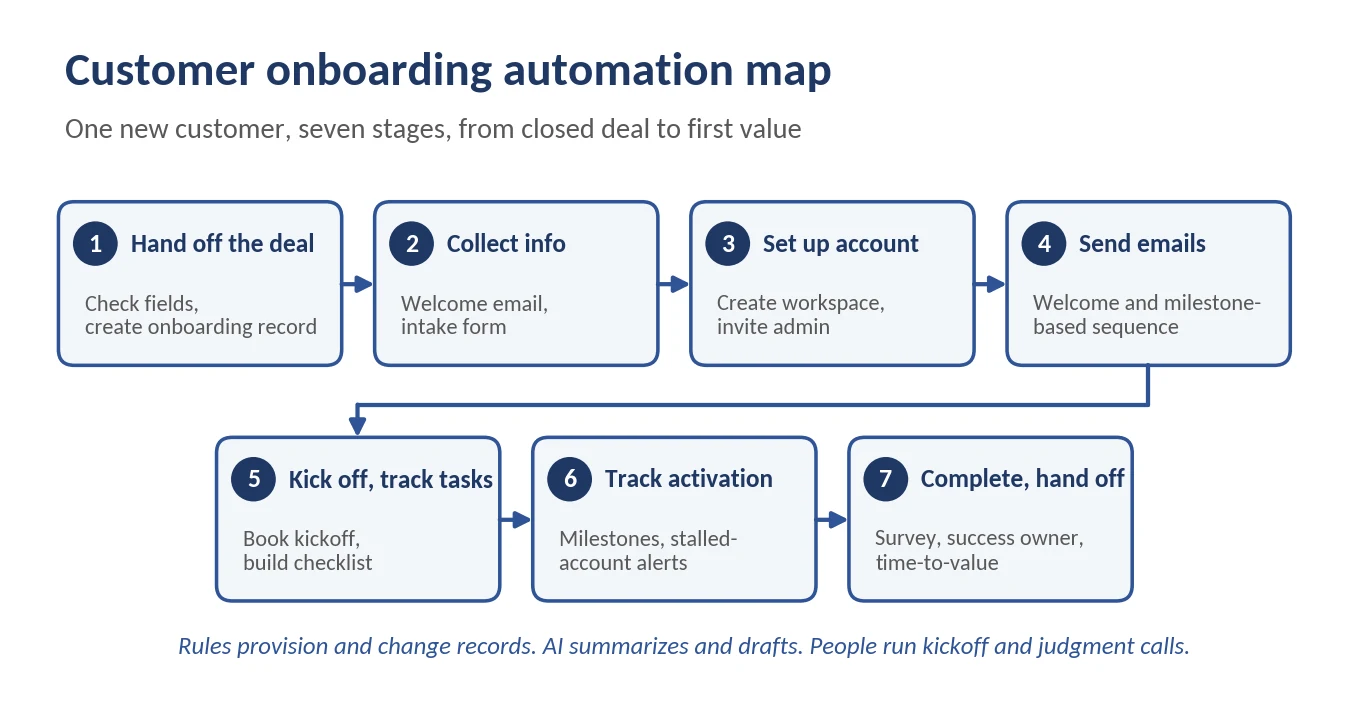
Customer onboarding automation uses software, CRM triggers and connected workflows to replace the manual steps of getting a new customer started: the sales handoff, collecting setup details, creating the account, sending welcome and progress emails, and tracking whether the customer reaches first value. Done well, every new customer gets the same reliable start, and your team spends its time on the conversations that need a person.
In a 5-20 person SaaS company, onboarding usually depends on whoever closed the deal or whoever is least busy. Details sit in call notes, accounts are set up by hand, welcome emails go out when someone remembers, and nobody notices a customer who signed and then went quiet. This guide follows one new customer through seven stages, from the closed deal to the first value milestone. For each stage you get the trigger, the steps, the fields involved, where AI fits and where a person should stay in the loop. It builds on our AI workflow automation guide and links to our guides on CRM automation, lead management automation and support ticket automation.
A note on scope: this guide is about onboarding paying customers of a B2B SaaS product after the deal closes. It isn’t about onboarding new employees, which is an HR process, or onboarding clients of a services firm. It is also a set of practical designs based on common SaaS operations, not a client case study, and we don’t quote results for it.
What customer onboarding automation is (and what it isn’t)
Customer onboarding is the period between a customer signing up or signing a contract and the point where they get real value from your product. Customer onboarding process automation hands the repeatable parts of that period to software. The usual areas are:
- Handoff: passing deal details from sales to whoever runs onboarding.
- Information collection: gathering the details you need to set the customer up.
- Account setup: creating the workspace, plan settings and first user.
- Onboarding emails: welcome messages, reminders and next steps.
- Kickoff and tasks: scheduling the first call and tracking the internal checklist.
- Activation tracking: watching whether the customer reaches the milestones that signal value.
- Completion and handoff: closing out onboarding and passing the customer to ongoing success and support.
Customer onboarding vs. employee onboarding, client onboarding and product-led onboarding
Search results for this topic mix several different ideas, so it helps to separate them:
- Employee onboarding is the HR process of bringing a new hire into your company. It uses similar automation ideas but different systems and owners, and it isn’t covered here.
- Client onboarding usually describes services firms and agencies taking on a new client, often with contracts, documents and invoices. SaaS customer onboarding shares some of that, but it also involves provisioning a product account and driving product adoption.
- Product-led onboarding guides users inside the product through checklists, tours and prompts. It works alongside the workflow in this guide, which covers what happens around the product: handoff, setup, email, tasks and tracking.
- CRM automation keeps customer records accurate across the business. Onboarding writes its status and milestones back to those records. Our CRM automation guide covers the wider set, including closed-won handoff.
This guide covers the SaaS customer version: a paying B2B customer, a CRM, a product with accounts to set up and a small team to run it all.
Why small SaaS teams struggle with onboarding
- Incomplete handoffs: What sales learned in the deal, such as goals, promised integrations and key contacts, doesn’t reach whoever sets the customer up.
- Onboarding lives in someone’s head: There is no checklist, so steps get skipped when a person is busy or away.
- Manual account setup: An engineer or founder creates accounts by hand, which delays access and invites mistakes in plan limits and permissions.
- Late or generic emails: Welcome emails depend on memory, and every customer gets the same sequence regardless of progress.
- Long email threads for basic details: Collecting admin names, integrations and data to import takes several rounds.
- Stalled customers go unnoticed: Nobody sees the account that was set up and never reached first value until renewal.
- No measure of time to value: Without milestone dates, you can’t tell which step slows customers down.
None of these needs AI to fix. Most need a clear definition of “onboarded,” a clean CRM and a few connected tools.
Rule-based vs. AI-assisted onboarding automation
Most onboarding automation is plain rules: when a deal moves to closed-won and the handoff fields are complete, create the onboarding record and assign the owner. Rules are predictable, so use them for handoff checks, provisioning, email triggers, task creation, milestone tracking and alerts.
AI helps where the input is messy text: sales notes, call transcripts, free-text goals in an intake form and the history of a stalled account. It can summarize those into a handoff brief, classify goals into your use-case categories, draft a personalized first line for a welcome email or summarize an account’s progress. The practical rule: use AI to read and draft, and use fixed rules to provision accounts and change records. An AI step should never create accounts, change plan settings or send customer emails on its own without review.
What to settle before you automate
Automating a vague onboarding process only makes the vagueness faster. Before building anything, write down six things:
- What “onboarded” means: the specific first-value milestone, such as data connected and a first report created, that tells you a customer has gotten started. Everything else in the workflow points at it.
- Your onboarding segments: for example self-serve, standard and high-touch, with a rule for which customer goes where. Segments decide which steps are automated end to end and which involve a person.
- Required handoff fields: the details sales must record before a deal can start onboarding, such as plan, start date, primary and technical contacts, use case and promised integrations.
- Your milestones and target windows: the steps between signing and first value, and how long each should take for each segment, based on your own history.
- What setup can be done automatically: which parts of account creation your product can do through an admin API or script, and which need a person.
- One owner for the workflow: a named person who approves changes to the process and checks failed runs.
The customer onboarding workflow, stage by stage
Tool names are examples, not endorsements. Use whichever tools your team already runs, and check what your CRM, email tool and product’s admin features include before building.
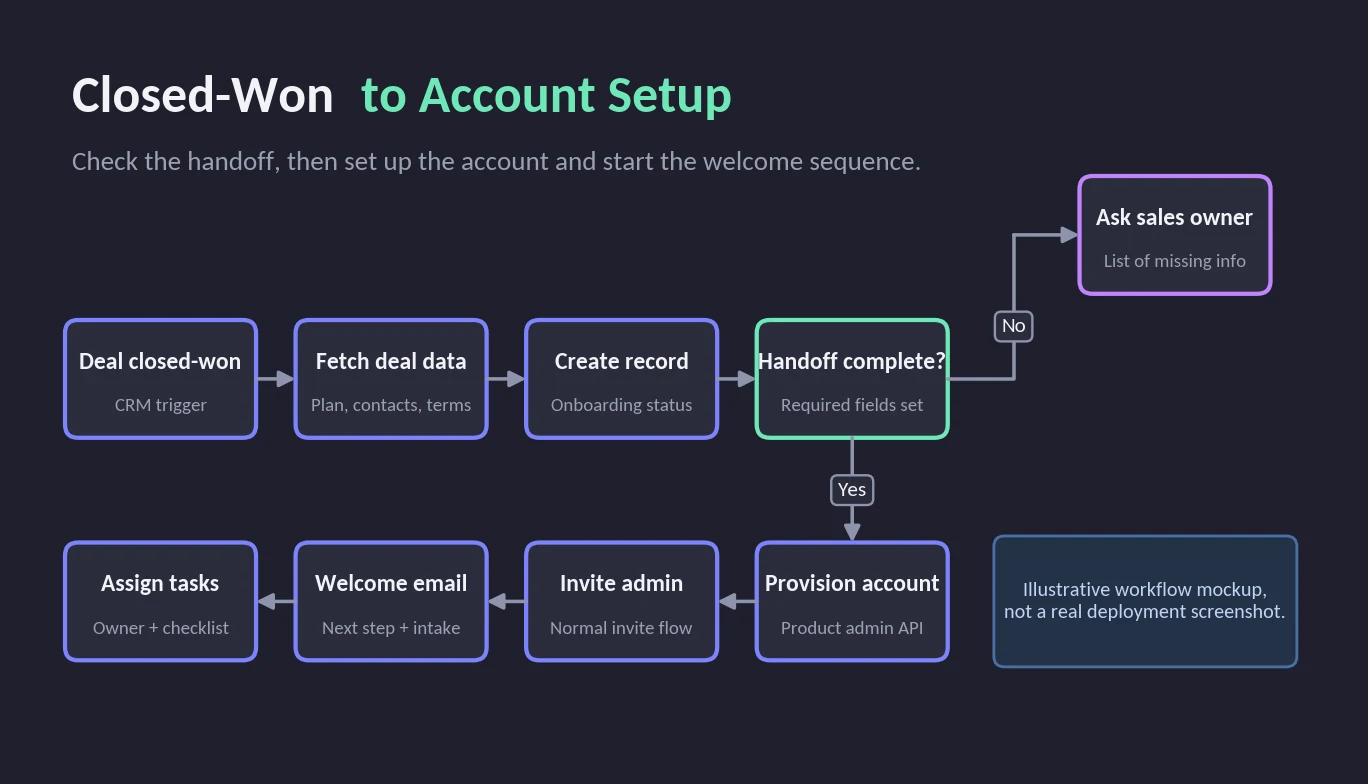
1. Hand off the closed deal
- Problem: Sales knows what the customer was promised, but the details live in call notes, Slack threads and memory, so onboarding starts late or with gaps.
- Trigger: A deal moves to closed-won in the CRM, or a contract signature or first payment is confirmed.
- Steps:
- Detect the closed-won event and pull the deal, company and contact records.
- Check the required handoff fields: plan, contract start date, primary and technical contacts, use case, promised integrations, success goal and any special terms.
- If anything is missing, notify the sales owner with the list and hold the next steps until it’s filled.
- Create the onboarding record, as a CRM object, a project or a row in a tracker, with the status “Not started.”
- Assign the onboarding owner by rule, such as segment, plan size or availability.
- Post a handoff brief to the owner in Slack or email, with links to the deal and notes.
- CRM fields touched: Deal ID, company, plan, contract start date, primary and technical contacts, use case, promised integrations, success goal, onboarding owner, onboarding status.
- Where AI fits: Summarizing sales notes into a short handoff brief: goals, concerns and promised items. The summary should only use what the notes say and mark anything not mentioned as unknown.
- Human checkpoint: The sales owner confirms the handoff, and the onboarding owner reads the brief before contacting the customer.
- Typical tools: CRM (HubSpot, Pipedrive, Salesforce), Slack, task or project tool, n8n or Make.com.
- Watch for: Deals marked closed-won before the contract or payment is complete. Check the contract and billing status fields before provisioning anything, and handle reversals so a reopened or cancelled deal pauses onboarding.
2. Collect customer information
- Problem: Setup details get collected over a long email thread, and every missing detail delays kickoff.
- Trigger: The handoff is marked complete.
- Steps:
- Send a short welcome email from the onboarding owner’s name, with a link to an intake form.
- Ask only what setup needs: the admin’s name and email, people to invite, integrations to connect, data to import, goals and preferred kickoff times.
- When the form is submitted, write the answers to the onboarding record and mark intake complete.
- If the form isn’t completed after your set time, send one reminder, then create a task for the owner to follow up personally.
- Optionally classify the free-text goals into your use-case categories.
- CRM fields touched: Intake status, admin contact, users to invite, integrations required, data import needed, goals, intake completed date.
- Where AI fits: Classifying free-text goals into your categories and summarizing them for the owner.
- Human checkpoint: The owner reviews the intake before setup and handles any unusual requests.
- Typical tools: Form tool or in-app form, CRM, email, n8n or Make.com.
- Watch for: Asking for too much up front, and sending the form to the wrong person. Confirm contact roles, because the champion who bought the product is often not the admin who will set it up. Never collect passwords or API keys through a form or email; use a secure method.
3. Set up the account
- Problem: Setup is done by hand by an engineer or founder, which delays access and risks mistakes in plan limits and permissions.
- Trigger: Intake is complete, and the contract or payment is confirmed.
- Steps:
- Check the preconditions: contract signed, billing status as your policy requires and intake complete.
- Check whether the account already exists, so reruns don’t create duplicates.
- Create the workspace or tenant through your product’s admin API or an internal script, with the right plan, limits and defaults.
- Create the admin user and send an invitation through your normal invite flow or single sign-on. Never email a password.
- Apply plan-based settings, such as seats, feature access or starter templates.
- Write the account ID, workspace link and setup status back to the CRM.
- If any step fails, stop, log the error and alert the owner instead of retrying blindly.
- CRM fields touched: Account or workspace ID, plan, seats, setup status, setup completed date, setup error.
- Where AI fits: Not for provisioning. At most, summarizing the intake into a setup checklist for a person to check.
- Human checkpoint: Approval for larger or custom accounts, and the owner confirms the admin’s first login.
- Typical tools: Your product’s admin API or backend script, CRM, billing tool, n8n or Make.com.
- Watch for: Duplicate accounts from reruns, over-powerful credentials and custom contract terms. Use least-privilege credentials stored in the tool’s credential store, log every change and route non-standard deals to manual setup. If your product has no admin API, this stage needs engineering work first.
4. Send onboarding emails
- Problem: Welcome emails go out late or not at all, or every customer gets the same calendar-based sequence whatever their progress.
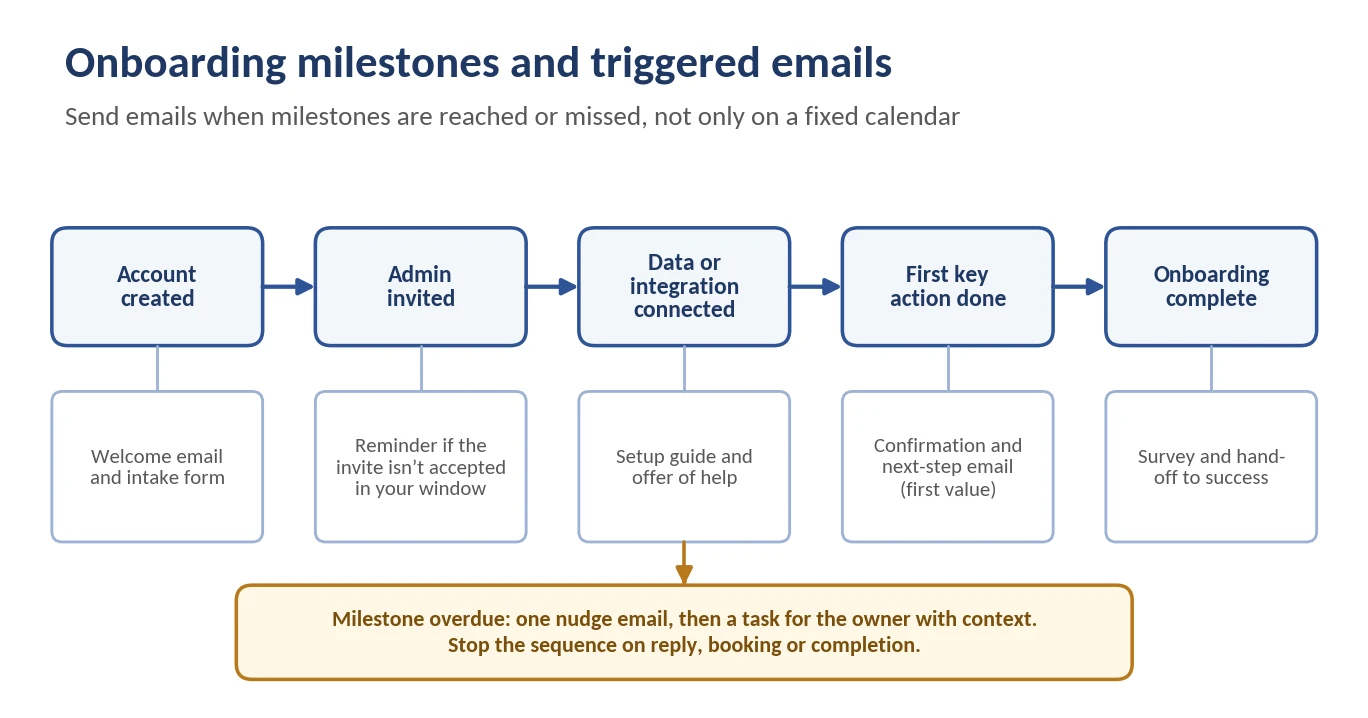
- Trigger: The account is created, and then each milestone event or missed milestone.
- Steps:
- Send the welcome email with the login link, the first step and who to contact.
- Choose the sequence by segment, such as self-serve, standard or high-touch.
- Trigger later emails when milestones are reached or missed, for example the admin hasn’t accepted the invite after your set window, not only on fixed days.
- Give each email one clear action.
- Stop the sequence when the customer replies, books the kickoff or completes the milestone.
- Log each email on the customer’s record.
- CRM fields touched: Onboarding segment, sequence name, last email sent, emails sent count, last customer reply, opt-out status.
- Where AI fits: Drafting a personalized first line from the handoff brief, for the owner to approve. It should not send anything by itself.
- Human checkpoint: The owner replies personally to any response, and reviews templates each quarter.
- Typical tools: Email or lifecycle email tool, CRM, product event source, n8n or Make.com.
- Watch for: Sequences that keep running after a reply or booking, and emails sent to people who aren’t yet users. Decide who gets which email (admin or all invited users), and confirm consent and unsubscribe rules for the countries you sell into with someone qualified before you automate outreach.
5. Schedule the kickoff and track tasks
- Problem: Kickoff scheduling takes several emails, and the internal checklist lives in someone’s head.
- Trigger: Intake is complete, for segments that include a kickoff call.
- Steps:
- Send a scheduling link for the kickoff to the right contacts.
- When the kickoff is booked, update the onboarding record and create the owner’s checklist from a template for that segment.
- Set task due dates relative to the kickoff date.
- Send the owner a reminder before the kickoff with the handoff brief and intake answers.
- After the kickoff, prompt the owner to log notes and update milestones.
- If the kickoff isn’t booked after your set time, create a task for the owner to call.
- CRM fields touched: Kickoff date, attendees, checklist template, task due dates, kickoff notes.
- Where AI fits: Drafting a kickoff agenda from the intake and a follow-up recap from the owner’s notes, for the owner to edit.
- Human checkpoint: The owner runs the kickoff and confirms the recap before it’s sent.
- Typical tools: Scheduling tool, CRM tasks or a project tool, calendar, n8n or Make.com.
- Watch for: Checklist templates that go stale as the product changes, and time zone mistakes for international customers. Skip the kickoff step for self-serve customers.
6. Track activation and catch stalled accounts
- Problem: Nobody notices an account that was set up and never reached first value until renewal is near.
- Trigger: Product events, a daily check or a milestone passing its target window.
- Steps:
- Define the milestones, for example admin logged in, teammates invited, data or integration connected and the first key action completed.
- Send product events to the CRM or onboarding record through a webhook or scheduled sync.
- Update each account’s milestone fields and current stage.
- Compare each account’s progress with the expected windows for its segment.
- When a milestone is overdue, send one nudge email and create a task for the owner with context.
- If the account is still stalled after a second window, alert the onboarding lead or founder.
- CRM fields touched: Milestone dates, current milestone, days in stage, stalled flag, last product activity, nudge count.
- Where AI fits: Summarizing an account’s progress and likely blockers from events and notes, for the owner to read. A person decides whether an account is at risk.
- Human checkpoint: The owner decides what to do about each stalled account, usually a call or a message.
- Typical tools: Product analytics or event source, CRM, Slack, n8n or Make.com.
- Watch for: A milestone that doesn’t reflect real value, event data that arrives late or incomplete, and alert fatigue from flagging every quiet account. Send only the event data you need into the CRM. The health-monitoring side is covered further in our CRM automation guide.
7. Complete onboarding and hand off to success and support
- Problem: Onboarding never has a clear end, so customers fall between onboarding and ongoing success, and nobody measures time to value.
- Trigger: The first-value milestone is reached and the checklist is done, or the owner marks onboarding complete.
- Steps:
- Confirm completion by rule (milestones done) and by the owner.
- Update the CRM lifecycle stage and write the onboarding completed date.
- Calculate the time from closed-won to first value.
- Send a completion email introducing the support channel and ongoing contact, with a short feedback survey.
- Create a handoff task for the success owner or set the next check-in date.
- Add the account to the monthly onboarding report.
- CRM fields touched: Onboarding completed date, time to first value, lifecycle stage, success owner, feedback score and comments, next check-in date.
- Where AI fits: Grouping survey comments into themes and drafting the handoff note to the success owner.
- Human checkpoint: The owner decides when onboarding is complete and reads the feedback.
- Typical tools: CRM, survey tool, email, Slack, spreadsheet or BI tool, n8n or Make.com.
- Watch for: Declaring onboarding complete too early, and survey fatigue. Keep monthly snapshots, because the CRM only shows the current state. Make sure the customer knows how to reach support, whose workflow is covered in our support ticket automation guide.
Worked example: one new customer, end to end
To make the stages concrete, here is one hypothetical customer moving through the workflow. The companies, the people and the setup are invented for illustration, and no results are implied.
The setup: a ten-person SaaS company with HubSpot as the CRM, an intake form, a scheduling tool, an admin API on its product and Slack. A fictional operations team signs on the standard plan. Jordan, the operations lead, is the main contact.
| Step | What happens | Stage |
|---|---|---|
| 1 | The deal moves to closed-won. The workflow finds the use case and technical contact missing, asks the sales owner to add them, then creates the onboarding record and assigns the owner. The owner receives a short handoff brief. | Hand off the deal |
| 2 | Jordan gets a welcome email with the intake form. Answers on the admin, integrations and data to import are written to the record. A reminder is set in case the form isn’t completed. | Collect info |
| 3 | With the contract and billing confirmed and intake complete, the workflow checks that no account exists, creates the workspace on the standard plan, invites the admin through the normal flow and writes the account ID back to the CRM. | Set up account |
| 4 | The welcome email goes out with the login link and first step. The standard sequence is chosen, and later emails depend on milestones reached. | Send emails |
| 5 | Jordan books a kickoff through the scheduling link. The owner’s checklist is created from the standard template with due dates relative to that date. | Kick off, track tasks |
| 6 | Product events update the milestones. Data connects, but the first key action doesn’t happen within the window, so Jordan gets one nudge and the owner gets a task with context. | Track activation |
| 7 | The first key action completes. The owner marks onboarding complete, the CRM records the time to first value, Jordan receives the survey and a success owner is assigned. | Complete, hand off |
What to automate and what to keep human
The more structured the input and the easier a step is to undo, the safer it is to automate. Anything customer-facing that needs judgment, or that changes a customer’s live account, needs a person until your rules have a track record.
| Automate fully | Automate with human approval | Keep human |
|---|---|---|
| Handoff field checks Creating the onboarding record and tasks Assigning the owner by rule Welcome and intake emails from templates Intake answers written to the CRM Milestone tracking from product events Reminders and nudges Monthly reporting calculations | Account provisioning for standard plans, after checks AI-drafted handoff briefs and recaps Personalized lines in emails Marking onboarding complete Flagging an account as at risk Setup for non-standard contracts | The kickoff conversation Customer goals that don’t match the standard setup Security, data and compliance questions Commercial terms and plan changes Replying to a frustrated customer Deciding how to rescue a stalled account |
Which metrics to track
Measure against your own baseline before and after you automate. Public benchmarks vary widely by product and customer type, so this guide doesn’t quote them.
| Metric | How to measure it | What it tells you |
|---|---|---|
| Time to first value | First-value date minus closed-won date, by segment | Whether onboarding is getting faster |
| Closed-won to kickoff | Kickoff date minus closed-won date | How fast the handoff and scheduling work |
| Intake completion | Share of customers completing intake within your window | Whether the form and reminders work |
| Setup errors | Failed or manual-fix account setups | Reliability of provisioning |
| Stalled accounts | Accounts past a milestone window | Where customers get stuck |
| Onboarding completion | Customers reaching first value divided by customers started | How many customers get to value |
| Owner time per onboarding | Hours logged per customer, by segment | How much the automation saves |
| Failed runs | Errors in the workflow log | Reliability of the automation itself |
CRM automation, Make.com, n8n or a dedicated onboarding tool?
Many CRMs include workflow tools that handle onboarding steps inside the CRM, such as creating tasks, assigning owners and sending emails when a deal stage changes. What is included varies by CRM and plan, so check yours before building anything.
Reach for an external tool like n8n or Make.com when the workflow spans several systems (the CRM, your product’s admin API, a form tool, billing, Slack and an email tool), when it needs an AI step, or when error handling and retries matter. Dedicated onboarding platforms, such as Rocketlane or GUIDEcx, exist for teams whose onboarding is a multi-week project with many customer-side tasks. For lighter onboarding, a CRM and a few connected tools are often enough.
| CRM built-in automation | Make.com | n8n | |
|---|---|---|---|
| Best for | Tasks, owners and emails driven by deal stage changes | Straightforward flows, such as closed-won to form to welcome email to Slack | Multi-stage flows with provisioning, branching, retries and AI steps |
| Reach beyond the CRM | Varies by CRM and plan | Wide, through integrations | Wide, with room for custom code |
| Technical comfort needed | Lower | Moderate | Higher |
| Trade-off | Limits depend on your plan and the CRM | Can get harder to manage as scenarios grow | Takes more setup and skill |
Our rule of thumb: use your CRM’s own workflows for handoff checks, tasks and stage-based emails when they cover your needs. Add Make.com to connect a form, the CRM and Slack in a simple chain. Choose n8n when onboarding includes provisioning through your product’s API, branching by segment, retries and error alerts. For current pricing and features, check each vendor’s official pages, since these change often. For a wider comparison, see our AI workflow automation guide.
Mistakes to avoid and guardrails
Onboarding automation touches live customer accounts and the first impression of your product, so it needs safeguards from day one.
- Automating a broken process: Define “onboarded,” the segments and the required handoff fields first.
- One sequence for everyone: Segment by customer type and trigger emails on milestones, not only on the calendar.
- Provisioning without checks: Verify the contract, billing status and whether the account already exists before creating anything.
- No failure handling for setup: If a paying customer ends up with no account and no alert, you have a worse experience than manual setup. Stop, log and alert on every failure.
- Over-powerful credentials: Give the automation least-privilege access and store secrets in the tool’s credential store.
- Emailing credentials: Use invite links or single sign-on. Never send passwords or API keys by email.
- Emails that don’t stop: End sequences on reply, booking or milestone completion, and decide which users receive which emails.
- AI claims in customer messages: Keep AI drafts factual and let the owner approve anything that goes to the customer.
- Flagging every quiet account: Use clear overdue rules and one nudge, then a task for a person, so alerts stay meaningful.
- No owner: Name one person responsible for the workflow and for the checklist templates.
A 30-day plan to launch your first onboarding workflow
Week 1 (days 1-7): Map and define. Write down what happens today from closed-won to first value, with times for each step. Define “onboarded,” your segments, required handoff fields, milestones and owners.
Week 2 (days 8-14): Build handoff and intake. Build stages 1 and 2 with alerts going to a test channel. Test with sample deals, including one with missing fields and one reversed deal.
Week 3 (days 15-21): Go live with emails and tasks. Run real deals through handoff, intake and the welcome emails (stages 1, 2 and 4), and add kickoff scheduling and the checklist (stage 5). Keep account setup manual but record what a person did, so you know what to automate.
Week 4 (days 22-30): Add setup and tracking. Automate the standard-plan setup (stage 3) with approvals, then add milestone tracking, stalled-account alerts and completion (stages 6 and 7). Start tracking the metrics above and document the workflow and its owner. For a fuller version of this plan, see our AI workflow automation guide.
Build it yourself or get help?
Plenty of small teams can build a first version themselves. Use this as a rough guide.
Building it yourself usually works when:
- Your CRM’s built-in workflows cover handoff, tasks and emails.
- Account setup is simple or stays manual for now.
- Someone on the team is comfortable with visual builders and has time to maintain the result.
Bringing in help makes sense when:
- The workflow spans the CRM, your product’s admin API, billing, email and Slack.
- Account setup needs API or webhook work, approvals and error handling.
- You need product events in the CRM to track activation.
- Nobody has the time to own and maintain it.
Either way, start with the handoff and intake stages before automating account setup. They show you quickly whether your required fields and milestones are right.
Frequently asked questions
What is customer onboarding automation?+
It is the use of software, CRM triggers and workflows to handle repetitive onboarding steps automatically, such as the sales handoff, information collection, account setup, welcome emails, task creation and progress tracking, so every new customer gets a consistent start.
What is a customer onboarding workflow?+
It is the sequence of steps and triggers that takes a new customer from a signed deal to first value. For a SaaS team, that is typically handoff, intake, account setup, welcome emails, kickoff, milestone tracking and a handoff to ongoing success.
What should I automate first in customer onboarding?+
Start with the handoff checks and the welcome and intake emails. They are low-risk, easy to test and quickly show whether your required fields and milestones are right. Automate account setup after those are stable.
How do I automate customer onboarding emails?+
Trigger emails from CRM and product events, such as account creation, an accepted invite or a completed milestone, rather than only on fixed days. Choose the sequence by segment, give each email one action and stop the sequence when the customer replies, books or completes the step.
What is a customer onboarding specialist?+
A customer onboarding specialist is the person who helps new customers get set up and reach first value. In a small SaaS company, this role is often combined with customer success or support, or handled by a founder.
What does “onboarding experience” mean?+
It is how a new customer experiences the period from signing up to getting value: how smooth the handoff, setup, communication and first results feel. Automation affects it by making each step faster and more consistent.
Is customer onboarding the same as employee onboarding?+
No. Customer onboarding gets paying customers to first value in your product. Employee onboarding brings new hires into your company. The automation ideas overlap, but the systems, owners and risks differ.
What is CX automation?+
CX, or customer experience, automation uses software to handle repeatable steps across the customer journey, such as onboarding, support and feedback. Onboarding is one of the places where it is most useful for a small team.