| SEO title | Lead Management Automation for B2B SaaS: Demo to Follow-Up |
|---|---|
| Meta description | See how small B2B SaaS teams automate lead management from demo request to follow-up: workflow steps, CRM fields, tools and mistakes to avoid. |
| URL slug | /blog/lead-management-automation-b2b-saas |
| Primary keyword | lead management automation |
| Secondary keywords | SaaS lead management automation, demo request automation, automate lead follow-up, lead routing automation, lead scoring automation, n8n lead management workflow, CRM lead automation |
| Search intent | Informational with commercial investigation (Cluster 2, supports Cluster 4 sales ops and the AI workflow automation pillar) |
| Schema | Article + FAQPage |
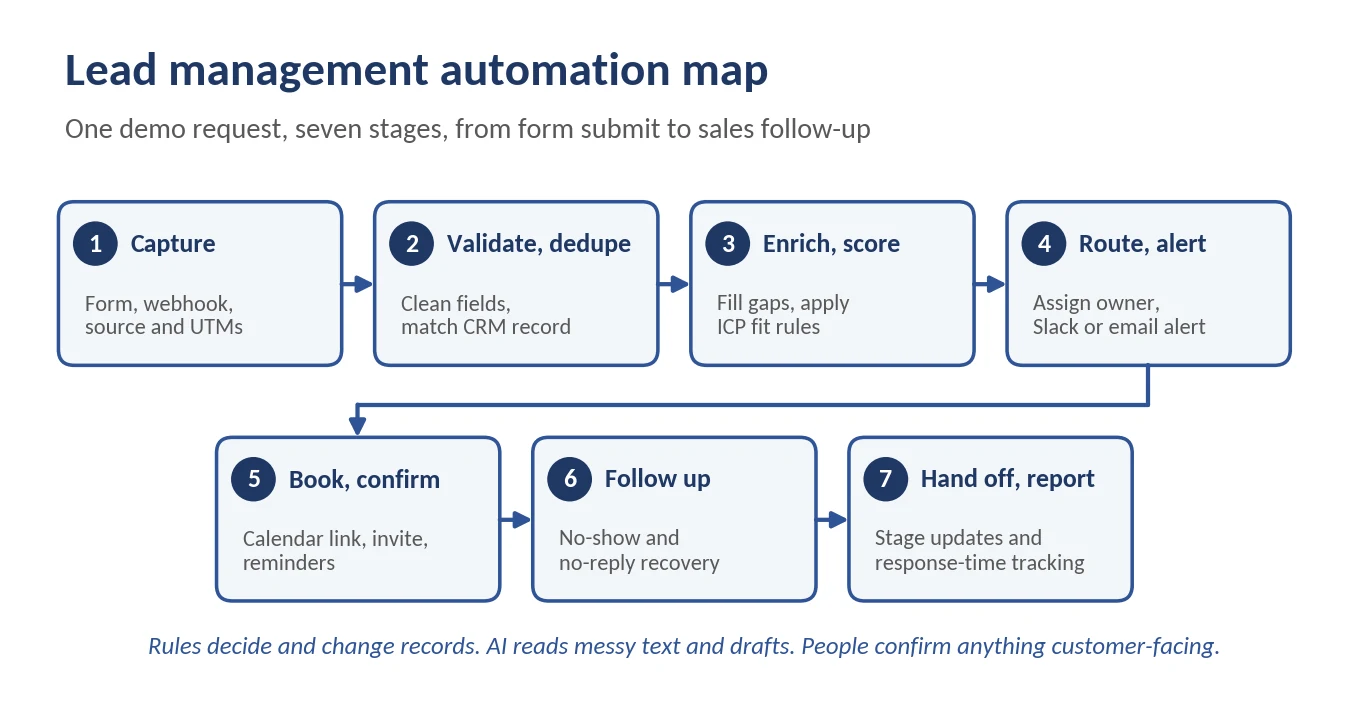
Lead management automation uses rules, integrations and, where it helps, AI to capture, validate, route, score and follow up on leads automatically. For a SaaS team, that means every demo request lands in the CRM once, reaches the right person quickly and gets a follow-up even when nobody remembers to send one.
In a 5-20 person SaaS company, the people who run demos also build, onboard and support. Leads wait in an inbox, get entered twice or reach the wrong person, and the gap between form submission and first call is where interest fades. This guide follows one demo request through seven stages, from form submission to sales follow-up. For each stage you get the trigger, the steps, the CRM fields involved, where AI fits and where a person should stay in the loop. It covers the lead’s journey; for the wider CRM clean-up behind it, see our guide to CRM automation for small B2B SaaS teams and our broader AI workflow automation guide.
A note on what this guide is: the workflows and the worked example below are practical designs based on common SaaS sales operations. They are not client case studies, and we don’t quote results for them.
What lead management automation is (and what it isn’t)
A lead is a person or company that has shown interest in your product, for example by requesting a demo, starting a trial or replying to an outreach email. Lead management is everything that happens to that lead between first contact and the point where a salesperson takes over or the lead is closed out: capturing the details, checking them, assigning an owner, following up and tracking the outcome. Lead management automation hands the repeatable parts of that work to software. The usual areas are:
- Capture: creating a lead record from forms, booking tools and chat.
- Validation: cleaning fields and catching duplicates.
- Qualification: enrichment and fit scoring against your ideal customer profile (ICP).
- Routing: assigning an owner and alerting them.
- Follow-up: confirmations, reminders, tasks and no-show recovery.
- Reporting: tracking response time, movement between stages and stuck leads.
Lead management vs. lead generation, marketing automation and CRM automation
These terms overlap, and many tools bundle all of them, but they cover different work:
- Lead generation brings new leads in through content, ads, outbound and referrals. Lead management starts once a lead exists.
- Marketing automation focuses on campaigns: email sequences, audience segments and nurturing. Lead management automation focuses on how each individual lead is handled, especially sales-ready ones.
- CRM automation is the wider job of keeping all CRM records accurate and moving, including pipeline stages and customer handoffs. Lead management automation is the part that runs from capture to first sales follow-up, and it depends on a clean CRM. Our CRM automation guide covers the wider set.
For scoping, start with what happens to a lead after the form is submitted. That is where small SaaS teams usually lose the most.
Why small SaaS teams lose leads before the first call
- Slow or inconsistent first response: The notification goes to a shared inbox, and whoever sees it first replies, or nobody does.
- Duplicates and split history: The same person submits twice or books from a different email, and their history ends up in two records.
- Unclear ownership: Leads wait for someone to claim them, and manual round-robin breaks when a rep is away.
- Lost source data: UTM parameters and landing pages are typed by hand or dropped, so reporting can’t show which channels produce demos.
- No safety net after booking: With no reminder and no no-show message, a missed demo quietly becomes a dead lead.
- Nowhere for non-buyers to go: Leads that aren’t ready now get ignored instead of moved to a nurture list.
None of these needs AI to fix. Most need clear rules, a clean CRM and a few connected tools.
Rule-based vs. AI-assisted lead automation
Most lead automation is plain rules: when a lead scores above this threshold, assign it to this owner. Rules are cheap, fast and predictable, so use them wherever the input is structured, such as routing, scoring, task creation and stage changes.
An AI step helps where the input is messy text: a free-text “what are you trying to solve?” answer, a job title, a company description or the history of an email thread. It can read that text and return something structured, such as a summary, an intent tag or a draft reply. The practical rule: use AI to read and draft, and use fixed rules to decide and change records. Start scoring with transparent rules your team can read and edit. Consider AI-assisted scoring only once you have enough history to test it against real outcomes.
What to settle before you automate
Automating a vague process only makes the vagueness faster. Before building anything, write down five things:
- What a qualified lead is: the specific criteria, such as team size, role, use case and region, that make a lead worth a demo.
- Which form fields are required: every extra field is another reason for a visitor to leave, so ask only for what routing and scoring need.
- A response-time target: a target your team can meet consistently. Automation can alert someone instantly, but a person still has to reply.
- Routing rules and a fallback owner: who gets which lead, and who covers when someone is away.
- One owner for the workflow: a named person who approves rule changes and checks failed runs.
The demo-request-to-follow-up workflow, stage by stage
Tool names are examples, not endorsements. Use whichever tools your team already runs, and check what your CRM, form tool and scheduling tool plans include before building.
1. Capture the demo request
- Problem: Demo requests arrive by form, email, chat and calendar booking, and the source details (campaign, page, UTM parameters) are lost or typed by hand.
- Trigger: A demo form is submitted or a booking is made.
- Steps:
- Receive the submission through a webhook or a native integration.
- Capture hidden fields: UTM parameters, landing page and referrer.
- Check the required fields. If something is missing, send the entry to a review queue instead of dropping it.
- Pass the clean payload to the validation stage.
- CRM fields touched: Email, name, company, role, message, lead source, campaign, landing page, create date.
- Where AI fits: Optionally tagging intent from a free-text field, such as “replacing spreadsheets,” “comparing vendors” or “pricing question.”
- Human checkpoint: Someone reviews the form-error queue weekly.
- Typical tools: Website form or form tool, scheduling tool (such as Calendly, Cal.com or your CRM’s meeting links), n8n or Make.com.
- Watch for: Spam and bot submissions, which should not alert sales, and forms that break silently after a website change. Run a test submission on a schedule so a broken form is caught by you, not by a missed lead.
2. Validate, deduplicate and create the CRM record
- Problem: The same person is created twice with different spellings or addresses, and mistyped or fake emails clog the pipeline.
- Trigger: A new captured submission.
- Steps:
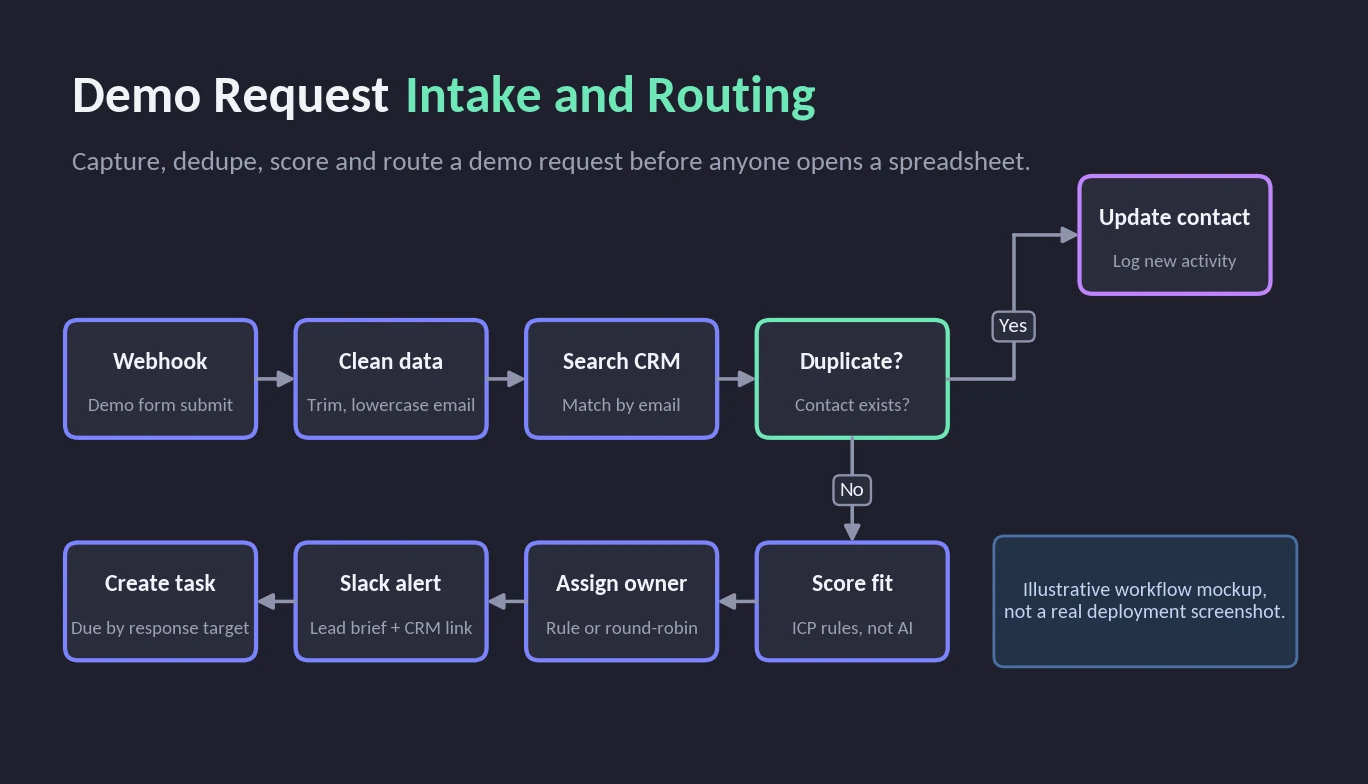
- Clean the data: trim spaces, lowercase the email and standardize name capitalization.
- Check the email format, and flag personal-domain addresses if your rules call for a work email.
- Search the CRM by email, then by company domain.
- If a match exists, update that record and log the demo request as new activity. If not, create the contact and associate the company by domain.
- Send fuzzy matches (similar name, same domain) to a review queue instead of merging them.
- CRM fields touched: Email (the main dedupe key), company domain, lead source, lead status, create date, last activity date.
- Where AI fits: Normalizing messy company names and job titles.
- Human checkpoint: A person reviews fuzzy matches. Merges stay manual until your rules have proven reliable.
- Typical tools: CRM (HubSpot, Pipedrive, Salesforce), n8n or Make.com.
- Watch for: Existing customers and open deals. A demo request from someone already in your pipeline should route to the account owner, not start a new lead. Check for an existing customer or open deal before treating the request as new. The dedupe pattern is covered in more depth in workflow 1 of our CRM automation guide.
3. Enrich and score for fit
- Problem: Reps research each lead by hand, key fields stay empty and priority is decided by gut feel.
- Trigger: A new or updated lead record.
- Steps:
- Check which key fields are empty.
- Pull company data from an enrichment provider and fill only the empty fields.
- Calculate a fit score against your ICP using simple rules such as company type, team size, role, region and use case.
- Write the score and a short reason to dedicated fields.
- Set the lead status by threshold, for example “Sales-ready” or “Nurture.”
- CRM fields touched: Company size, industry, country, role, ICP fit score, score reason, lead status.
- Where AI fits: Summarizing what the company does in one line, and mapping free-text industries onto your picklist values.
- Human checkpoint: Sales reviews borderline scores. Keep the scoring rules written down and easy to change.
- Typical tools: CRM, an enrichment provider such as Apollo.io, n8n or Make.com.
- Watch for: Enrichment data can be wrong or outdated, so never overwrite a field a person entered and note the source of enriched values. A low score should change the follow-up path, not delete or hide the lead.
Example fit-scoring rules. These values are illustrative. Replace them with criteria from your own ICP and review them as you learn which leads convert.
| Signal | Example rule | Example points |
|---|---|---|
| Company type | B2B software company | +3 |
| Team size | Inside your target range | +2 |
| Role | Founder, CEO or head of operations, growth or sales | +2 |
| Use case | Free-text answer describes a problem you solve | +2 |
| Region | A market you serve | +1 |
| Email type | Personal address when you sell to companies | -2 |
| Threshold | Mark “Sales-ready” at or above a set score (for example 6) | Set your own |
4. Route to an owner and alert instantly
- Problem: Qualified leads sit unclaimed until someone notices them, and manual round-robin breaks whenever a rep is away.
- Trigger: A lead reaches “Sales-ready” status or requests a demo.
- Steps:
- Check the qualification rule.
- Assign an owner by rule: the existing account owner first, then territory or segment, then round-robin among available reps.
- Update the owner field in the CRM.
- Send a Slack or email alert with a three-line lead brief and a link to the record.
- Create a first-response task due within your response-time target.
- If the lead is still untouched after a set time, escalate to a backup owner.
- CRM fields touched: Owner, lead status, first-response task due date, first-contact timestamp.
- Where AI fits: Writing the three-line brief for the rep: who the lead is, what they asked for and why they scored well.
- Human checkpoint: The rep confirms or reassigns the lead. Review the routing rules monthly.
- Typical tools: CRM, Slack or email, a shared calendar or availability source, n8n or Make.com.
- Watch for: Leads routed to someone who is out of office, so keep a fallback owner and an escalation step. Alert a named person plus a backup rather than a whole channel. An alert everyone sees often means nobody acts.
5. Book the demo and confirm it
- Problem: A lead asks for a demo and then waits through an email back-and-forth to find a time.
- Trigger: A lead passes your qualification rule, or a booking is made.
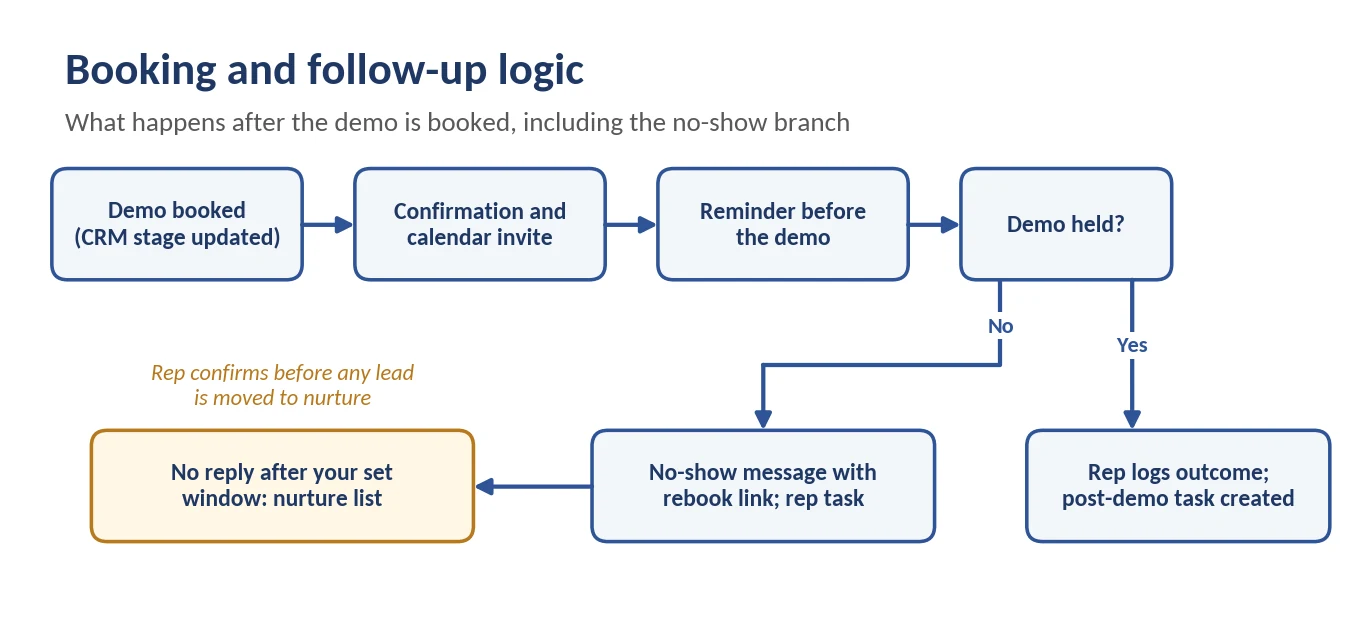
- Steps:
- Offer a scheduling link on the thank-you page and in the first email so the lead can self-book.
- When a demo is booked, update the CRM: stage, demo date and time, and demo owner.
- Send a confirmation with a calendar invite and a short note on what to prepare.
- Send a reminder before the demo at the interval you choose.
- Notify the rep with the lead brief.
- CRM fields touched: Demo date and time, demo owner, lead status or stage, booking source.
- Where AI fits: Drafting a short prep brief for the rep: what the lead asked, why they scored well and a one-line company summary.
- Human checkpoint: The rep reads the brief before the call.
- Typical tools: Scheduling tool, CRM, email, n8n or Make.com.
- Watch for: Offering self-booking to leads your rules say should get a sales email first, so add a branch for them. For international leads, check that confirmations and reminders show the lead’s time zone, which matters when you sell across the US, UK, Canada and Australia.
6. Follow up on no-shows and no-replies
- Problem: A booked lead who doesn’t show, or a lead who never replies, usually gets forgotten.
- Trigger: The demo time passes with no “held” outcome logged, or a lead stays silent past your set window.
- Steps:
- After the demo time, check whether the meeting was marked as held, by the rep or by your meeting tool.
- If not, create a task for the rep and prepare a short no-show message with a rebook link. Keep it as a draft for approval at first.
- If a lead hasn’t replied after your set window, create a task to try another channel, such as a call or LinkedIn message.
- After the final attempt, propose moving the lead to a nurture list. The rep confirms the move.
- Log every attempt in the CRM.
- CRM fields touched: Demo outcome, no-show flag, last contacted date, follow-up count, lead status, nurture reason.
- Where AI fits: Drafting the follow-up message from the lead brief and recent activity. The rep edits and sends it.
- Human checkpoint: The rep approves first-touch and no-show messages and confirms any move to nurture.
- Typical tools: CRM, email, scheduling tool, n8n or Make.com.
- Watch for: Sequences that keep running after a reply or a booking. Check for both before every step. Also confirm email consent and unsubscribe rules for the countries you sell into with someone qualified before you automate outreach.
7. Hand off after the demo and report
- Problem: Post-demo status is inconsistent, and nobody can say how fast leads are handled or where they stall.
- Trigger: A demo is marked held, plus a weekly schedule.
- Steps:
- When a demo is marked held, prompt the rep to log the outcome from a fixed list, for example interested, needs follow-up or not a fit.
- Update the lead or deal stage by rule from the outcome.
- Create a next-step task with a due date.
- Each week, calculate time to first response, leads by stage, demos booked and held, and leads stuck beyond your threshold.
- Flag missing data, such as leads with no owner or no outcome.
- Post the summary to Slack or email. An AI step can write the narrative from the calculated numbers.
- CRM fields touched: Demo outcome, stage, next step, next step date, first-contact timestamp, lead source.
- Where AI fits: Writing the weekly narrative from numbers you calculated, and drafting a post-demo recap email for the rep to edit.
- Human checkpoint: The rep logs the outcome. Compare the first several reports with your manual numbers before trusting them.
- Typical tools: CRM, spreadsheet or BI tool, Slack, n8n or Make.com.
- Watch for: Metrics the data can’t support. Response time only means something if first contact is timestamped consistently, for example by logging calls and emails automatically. Keep weekly snapshots, because the CRM only shows the current state. Reporting and closed-won handoff are covered further in workflows 6 and 7 of our CRM automation guide.
Worked example: one demo request, end to end
To make the stages concrete, here is one hypothetical lead moving through the workflow. The company, the person and the setup are invented for illustration, and no results are implied.
The setup: a nine-person SaaS company with a website demo form, HubSpot as the CRM, a scheduling tool and Slack. Alex, head of operations at a fictional software company, requests a demo.
| Step | What happens | Stage |
|---|---|---|
| 1 | Alex submits the demo form. A webhook fires and the workflow captures the UTM parameters and landing page. | Capture |
| 2 | The workflow cleans the email, searches the CRM, finds no match, creates the contact and associates the company by domain. | Validate and dedupe |
| 3 | Enrichment fills company size and industry. The scoring rules produce a fit score and write the reason: target role, B2B software, served region. | Enrich and score |
| 4 | The lead is Sales-ready. An owner is assigned by round-robin among available reps, a Slack message with a three-line brief goes to that rep, and a first-response task is created. | Route and alert |
| 5 | The thank-you page and confirmation email show the scheduling link. Alex books, the CRM stage updates and a reminder is queued. | Book and confirm |
| 6 | If Alex doesn’t attend, a no-show draft and a rep task are created. The rep approves the message before it goes out. | Follow up |
| 7 | After the demo the rep logs the outcome, the stage updates by rule and the lead appears in the weekly summary. | Hand off and report |
What to automate and what to keep human
The earlier a step sits in the workflow and the more structured its input, the safer it is to automate. Anything customer-facing or hard to undo needs a person until your rules have a track record.
| Automate fully | Automate with human approval | Keep human |
|---|---|---|
| Field cleanup and formatting Duplicate checks that flag, not merge Enrichment into empty fields only Routing by rule Internal alerts and tasks Confirmations and reminders for booked demos Metric calculations | AI-drafted first outreach and follow-ups No-show messages, until proven Moving a lead to nurture Merging duplicate records Stage changes based on call notes | The demo conversation Pricing and custom terms Judging borderline-fit leads Complex or sensitive questions, such as security or compliance Deciding to close a lead out |
Which metrics to track
Measure against your own baseline before and after you automate. Public benchmarks vary widely by market and deal size, so this guide doesn’t quote them.
| Metric | How to measure it | What it tells you |
|---|---|---|
| Time to first response | First-contact timestamp minus submission time | Whether routing and alerts work |
| Leads routed without manual touch | Share of leads assigned by rule | How much of your rules cover real leads |
| Lead-to-demo rate | Demos booked divided by Sales-ready leads | Quality of the form and first follow-up |
| Demo show rate | Demos held divided by demos booked | Whether reminders and confirmations work |
| Stale leads | Leads with no activity beyond your threshold | Where follow-up is slipping |
| Failed runs | Errors in the workflow log | Reliability of the automation itself |
n8n, Make.com or your CRM’s built-in automation?
Many CRMs include their own workflow tools, and they are often enough for actions that stay inside the CRM, such as assigning an owner, creating a task or sending an internal notification. What is included varies by CRM and plan, so check yours before building anything.
Reach for an external tool like n8n or Make.com when the workflow spans several systems (a form tool, scheduling tool, enrichment provider, Slack and the CRM), when it needs an AI step, or when the no-show and follow-up logic goes beyond what the built-in tool handles.
| CRM built-in automation | Make.com | n8n | |
|---|---|---|---|
| Best for | Actions that stay inside the CRM, such as owner assignment and tasks | Straightforward cross-tool flows, such as form to CRM to Slack to email | Multi-stage flows with branching, error handling and AI steps |
| Reach beyond the CRM | Varies by CRM and plan | Wide, through integrations | Wide, with room for custom code |
| Technical comfort needed | Lower | Moderate | Higher |
| Trade-off | Limits depend on your plan and the CRM | Can get harder to manage as scenarios grow | Takes more setup and skill |
Our rule of thumb: for this workflow, many teams can run the validation, scoring and routing stages inside the CRM. Add Make.com when you need to connect the scheduling tool, Slack and email in a simple chain. Choose n8n when the workflow needs branching, retries, error alerts and AI steps in one place. For current pricing and features, check each vendor’s official pages, since these change often. For a wider comparison, see our AI workflow automation guide.
Mistakes to avoid and guardrails
Lead data is the start of your revenue record, so automation that writes to it needs a few safeguards from day one.
- Over-automating the first touch: Let AI draft the first outreach and have a person send it until you trust the rules.
- Automating a messy CRM: Settle stage definitions and required fields first, or the workflow will spread the mess faster.
- Sequences that don’t stop: Check for a reply or a booking before every automated step.
- No error handling: Add failure alerts, retries and logs. A silent failure means a lead nobody ever sees.
- Overwritten data and bad merges: Fill empty fields only, flag duplicates instead of merging and keep a log of every change.
- Hidden scoring rules: Keep the rules written down and visible so sales can see why a lead scored the way it did.
- Alerting a channel instead of a person: Name an owner and a backup for every alert.
- AI-written content in records: Label AI-generated notes, keep them factual and let a person confirm anything that changes a field.
- Data and consent: Know what lead data goes to your enrichment and AI providers, and confirm email consent rules for each market you sell into.
- No owner: Name one person responsible for the workflow and for the CRM itself.
A 30-day plan to launch your first lead workflow
Week 1 (days 1-7): Map and define. Map the current path from demo request to first call and note how long each step takes. Write down your qualified-lead definition, required fields, routing rules and response-time target.
Week 2 (days 8-14): Build stages 1-4 in test mode. Build capture, dedupe, scoring and routing with alerts going to a test channel. Test with sample submissions, including duplicates, fake emails and an existing customer.
Week 3 (days 15-21): Go live with human review. Route real leads, review every alert and record, and fix the rules. Add booking and confirmation (stage 5).
Week 4 (days 22-30): Add follow-up and measure. Add stages 6 and 7 with drafts that need approval. Start tracking the metrics above, document the workflow and its owner, and pick the next improvement. For a fuller version of this plan, see our AI workflow automation guide.
Build it yourself or get help?
Plenty of small teams can build a first version themselves. Use this as a rough guide.
Building it yourself usually works when:
- The workflow stays inside your CRM plus one form tool and one scheduling tool.
- Someone on the team is comfortable with visual builders and has time to maintain the result.
- A mistake is cheap and easy to correct.
Bringing in help makes sense when:
- The workflow spans several systems, such as the CRM, an enrichment provider, scheduling, billing and Slack.
- It needs API or webhook work, error handling or AI steps.
- The lead data is sensitive.
- Nobody has the time to own and maintain it.
Either way, start with one stage rather than all seven. The capture, dedupe and routing stages deliver the most for the least effort.
Frequently asked questions
What is lead management automation?+
It is the use of rules, integrations and sometimes AI to handle repetitive lead work automatically, such as capturing leads, checking for duplicates, scoring them, assigning an owner, sending confirmations and reminders, and creating follow-up tasks.
What is a lead in CRM?+
A lead is a record for a person or company that has shown interest but has not yet been qualified or turned into a sales opportunity. Many CRMs keep leads separate from contacts and deals, and the exact model varies by CRM.
What is the difference between lead management and lead generation?+
Lead generation brings new leads in through content, ads and outbound. Lead management covers what happens to each lead once it exists: capture, validation, routing, follow-up and tracking.
What is lead routing?+
Lead routing is the set of rules that assigns each new lead to an owner, for example by existing account owner, territory, company size or round-robin among available reps, and then alerts that person.
How fast should we respond to a demo request?+
There is no single right number. Set a target your team can meet consistently, make sure the alert reaches a named person and a backup immediately, and track your actual time to first response. An instant automated acknowledgement helps, but it doesn’t replace a real reply.
Do I need AI for lead management automation?+
No. Most of it is rule-based. AI helps with messy text, such as free-text form answers, and with drafting briefs and follow-ups, but it should read and draft rather than make unreviewed changes to your records.
What should I not automate in lead management?+
Avoid unreviewed merges, automatic deletion, silently rejecting low-scoring leads, stage changes decided by an AI model, and first outreach to high-value leads that goes out without a person reading it.